A complete Russian layout
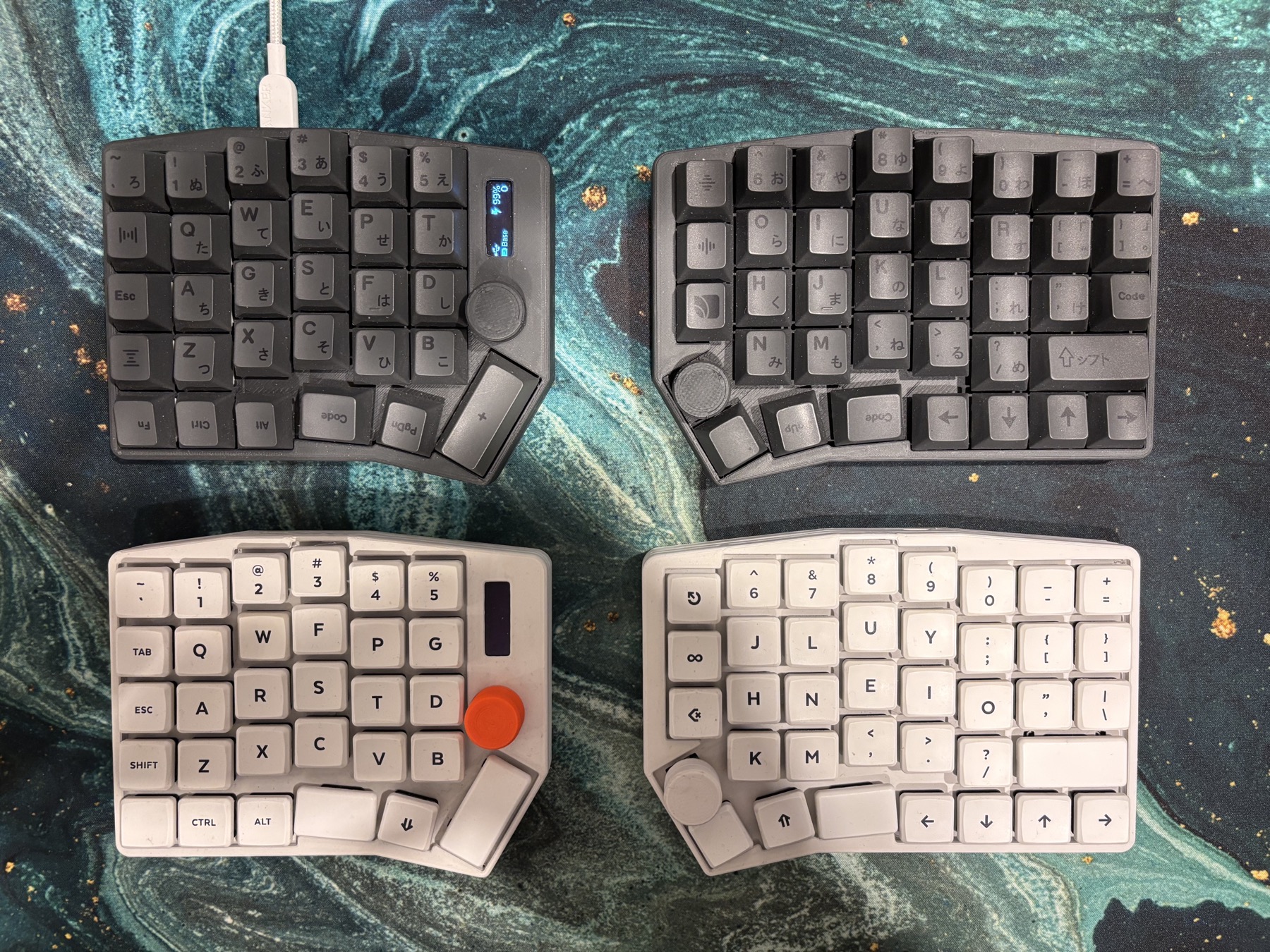
The extra column on the right leaves room for “Ъ” and the other Russian letters. There is no need to move them to another layer. Familiar positions are kept, with a few exceptions.
The full Russian layout fits, including “Ъ”.
Letters stay where you expect them, with only a few changes when moving to a split.
The 3D model could not be loaded.
Open pose studio (RU) ↗Low-profile case. Print in any colour.
Download caseLow profile for Choc v1 or v2, standard profile for MX. Choose keycaps to match your switches and print in your preferred colour. The MBK and Cherry caps in the photos are examples from the creator’s builds.
The extra column on the right leaves room for “Ъ” and the other Russian letters. There is no need to move them to another layer. Familiar positions are kept, with a few exceptions.
The pictured build has a large thumb key on the left and a knob below the screen. The right knob is optional: the PCB supports different key and encoder configurations. Both profiles can use a dongle or the left half as the central device.
Break off the outer column for the left half. Five identical PCBs give you two keyboards and one spare board. You could build one for yourself and one for a friend.
03 / NAME AND PLACE
Takmak is a rock formation near the creator’s home city. It gave the keyboard its name, and its topography became the artwork on the PCB.
This site uses the same artwork as the PCB silkscreen.
Download SVG artwork
Components, case preparation, PCB and firmware. A complete BOM and step-by-step photos will be added.
Choose a case profile and switches, then matching keycaps. The bottom case parts are universal. The creator’s builds use Choc v1 with MBK and Kailh MX with Cherry-profile caps. These are examples, not required combinations.
| Component | Low profile | Standard |
|---|---|---|
| Switches | Choc v1 / v2 | MX-compatible |
| Keycaps | Your choice, matched to the switches | |
| Controllers · 2 pcs | SuperMini nRF52840 or other nice!nano-compatible controllers | |
| Batteries · 2 pcs | EEMB 383454LC · LiPo · 3.7 V · 720 mAh · JST connector | |
| Central device | Separate dongle or left half — selected in firmware | |
| Encoders | EC11 with push button; right encoder optional | |
| Left display | OLED 0.91″ · 128×32 · I²C | |
One controller and battery per half. Add a separate dongle if you choose that configuration. EEMB 383454LC is the battery model specified by the creator; choose alternatives to fit the case. Hotswap sockets, fasteners and the reset button will be added to the BOM. Check your chosen switches and keycaps against the PCB revision and case.
Download the package for your profile. It includes original STEP files and slicer-ready STL files: tops and bottoms for both halves, reset buttons and knobs. STL dimensions are in millimetres.
For low profile, the Low Profile Screen knob goes on the left and Low Profile Button on the right if an encoder is fitted. The standard profile uses Regular: print one or two depending on your configuration. Choose any colour.
Check scale, part orientation on the print bed and compatibility with your PCB before printing the full set. Material, tolerances and print settings have not yet been finalised.
The universal PCB serves both halves. For the left configuration, break off the extra column; the display connects to the left half. Check the board revision and orientation first.
The 3D model shows a long thumb key on the left, and a separate key and EC11 on the right. This is one configuration; the right knob is optional. Combined footprints offer alternatives, not simultaneous placement of every component.
A soldering map for each half, the exact break-off line and assembly photos will be added after checking the manufactured board. The 3.1 sources are currently for inspection and development.
In the reviewed 3.1 schematic, JP1–JP5 bypass sections of the RGB chain. They are not required for the keys to work without RGB.
| Jumper | Bypasses LEDs |
|---|---|
| JP1 | D72, D40, D48 |
| JP2 | D65 |
| JP3 | D62 |
| JP4 | D56 |
| JP5 | D80 |
Leave the bypass open when its section is populated. Close it when the section is omitted, with the corresponding LEDs left out or isolated. Do not bridge a section containing active LEDs: this connects their data outputs together.
These are the jumpers’ functions in the schematic, not a ready-made left/right assembly table. The required bridges depend on your components and the parts of the PCB that are removed.
Either profile can use a separate dongle or the left half as the central device, depending on firmware. The creator’s low-profile build uses a dongle; the standard build uses the left half.
The photos show different letter layouts. The 3D legends reflect the creator’s builds. Set your own layout in the keymap; Russian letters fit without moving them to extra layers.
Takmak module for ZMK ↗Prebuilt firmware is not yet provided: source revisions have not been matched to the firmware running on the physical keyboards.
Before final assembly, test every key, encoder push button and both rotation directions, the display, and each half’s connection to the central device.
Test-fit the PCB in the case. Check key and reset-button travel and knob clearance. Repeat the tests with the bottom fitted. Internal assembly photos and fastener details are still being prepared.
Printable models, PCB sources and the ZMK module. Each case archive includes both halves and knob models; print the parts for your configuration.
About revisions. 3.0 is the last manufactured PCB. 3.1 adds Choc hotswap footprints and has not been manufactured yet. A verified production archive for 3.0 has not yet been identified.
Hardware files are for non-commercial use, as stated in the original README. Firmware and third-party libraries have their own licences. Checksums ↗